Privacy & Architecture
Code Screenshots Without Uploading Your Code
If you work on internal repos, client code, or pre-release features, pasting snippets into a hosted screenshot service with server rendering or share links is an unnecessary leak surface. Codeframe never uploads your code anywhere.
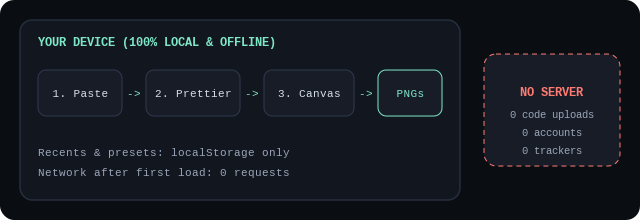
How Local-Only Rendering Works
- Static hosting only: Codeframe ships no backend endpoints, no database, and no user accounts.
- Bundled fonts & lazy parsers: JetBrains Mono (latin subset) and Prettier's standalone browser parsers are precached by the Service Worker on first visit.
- Zero analytics beacons: No third-party tracking scripts, no telemetry pings, and no snippet share URLs stored on a remote server.
- LocalStorage recents: Your last 15 exported sets and custom style presets live strictly in browser
localStorageand can be cleared in one tap.
Verify It Yourself in 10 Seconds
- Open Codeframe once so the offline Service Worker caches the app assets.
- Turn on Airplane Mode (or check Offline in browser DevTools → Network).
- Paste a snippet, switch themes, and export PNGs or a ZIP archive. Zero network traffic occurs.
Frequently Asked Questions
Does Codeframe store or index shared code?
No. Because there are no shareable snippet URLs or server databases, nothing you paste can ever be indexed or leaked.
What about the Windows desktop app?
The Windows WebView2 build embeds the same static bundle offline and blocks external navigation outside approved developer attribution links.
Ready to turn code into a clean carousel?
Paste Code Privately Now
Paste a snippet, pick a preset chip, and export crisp PNGs offline.