
Platform Guide · Instagram & LinkedIn
Code Screenshot Maker for Instagram Carousels
Squeezing 80 lines of code into a single Instagram image makes it impossible to read on a phone screen. Codeframe defaults to Instagram's optimal 4:5 portrait ratio and splits long snippets automatically into swipeable, high-contrast slides.
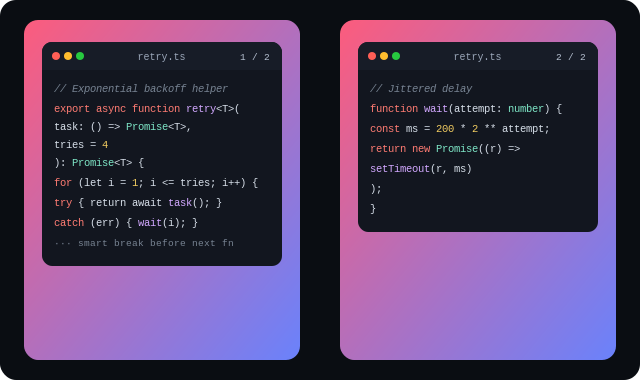
Why Smart Pagination Matters for Carousels
Manual cropping breaks syntax rhythm and leaves mismatched padding between slides. Codeframe keeps typography, theme, chrome, and margins identical across every slide in a set:
- Readable 14px default: Fits ~20 crisp lines of JetBrains Mono per
4:5slide without pinching to zoom. - Look-back seam scoring: Prefers blank lines, doc comments, closing braces, and lower-indent lines before ever falling back to a hard cut.
- Continuation markers: When a function has no blank lines and must split mid-block, both slides show a subtle faded continuation strip.
- Ordered exports: Files export strictly as
codeframe-01.pngthroughcodeframe-NN.pngat1x,2x(1080×1350), or3x(1620×2025) within safe iOS Safari memory caps.
Posting to X or LinkedIn Too?
LinkedIn document carousels and feed posts share the same 4:5 sweet spot. If your deck passes 4 pages, Codeframe automatically surfaces a one-tap "X only shows 4 — fit to 4?" chip so you can adapt the exact same snippet for X in one tap. Short 5-line snippets automatically suggest switching to 1:1.
Compare how this workflow stacks up against Carbon and ray.so, or see language-specific examples for TypeScript and Python.
Paste a snippet, pick a preset chip, and export crisp PNGs offline.